ITechX Solutions

ITechX · Apps · Designed for iPhone Duo

Duo Clipboard app icon

Duo Clipboard: Clipboard history for iPhone Duo

Copy once, paste anywhere. Save clips in one tap, organise them on boards, and paste from your keyboard. On iPhone Duo, history and preview sit side by side.

Duo Clipboard keeps everything you copy within reach, and it was designed for the iPhone Duo from the first pixel. Free, with a one-time Pro purchase. For iPhone with iOS 26 or later.

Download on theApp StoreComing soon
Duo Clipboard on the iPhone Duo cover display: clipboard history with the side bar

Closed, open, laptop

Designed for iPhone Duo

One app, three ways to hold it. The layout follows the pose, and works on every other iPhone too.

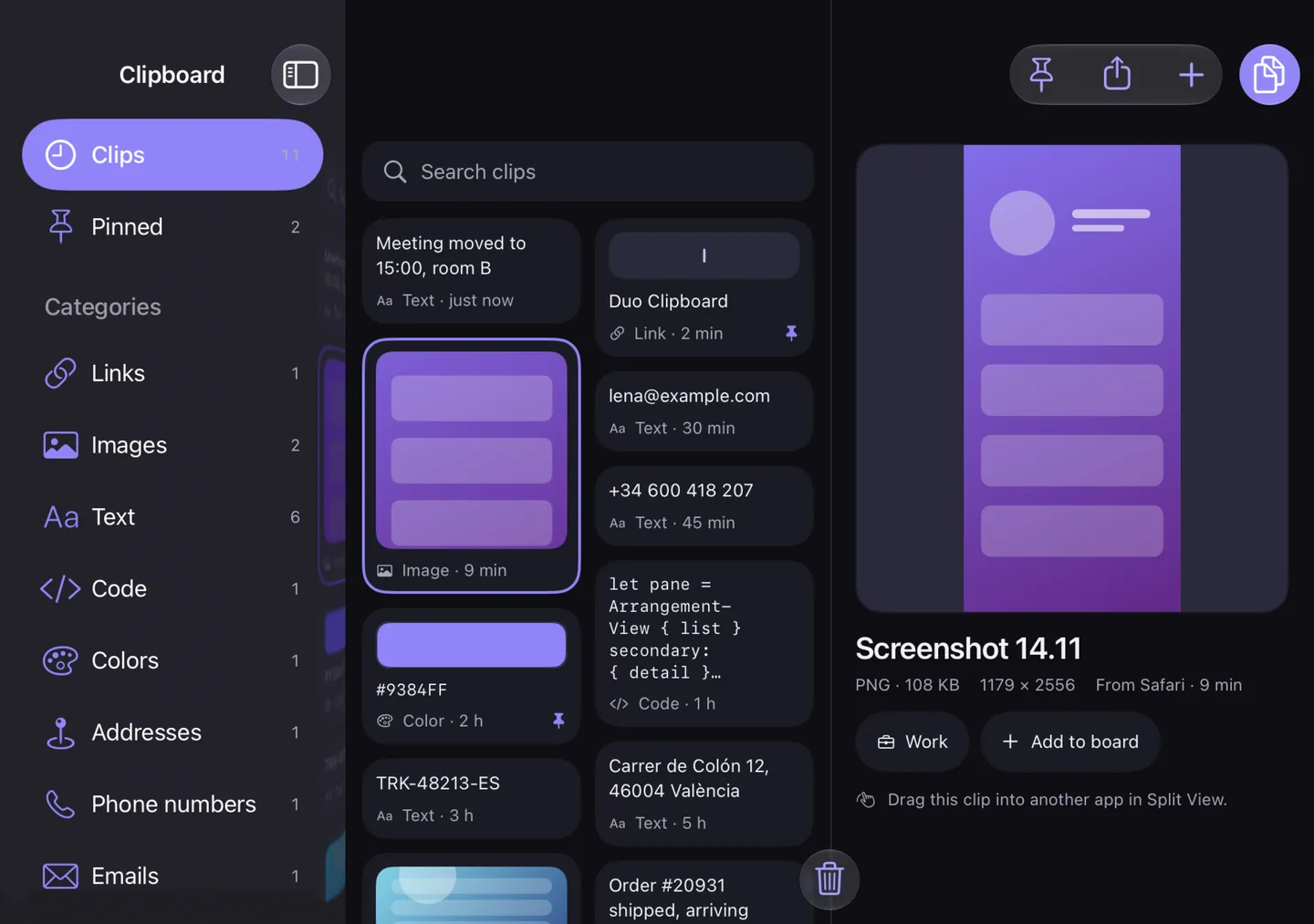
Duo Clipboard open: the sidebar, a grid of clips and a large preview, split at the fold
Open: the big screenUnfold and get a sidebar, a grid of clips and a large preview, split exactly at the fold.
Duo Clipboard on the cover display: text clips filtered in a single column
Closed: one-handedOn the cover display your history is a single column with big targets. Copy your last clip straight from the side bar, right under your thumb.
Duo Clipboard in laptop pose: the preview above the fold, history below
Laptop poseThe preview sits on top and your history below, with nothing on the crease.
An image clip in Duo Clipboard with Copy and Add to board

Made for real clips

Large previews for text, links, images, files and colours. Clean tracking parameters from URLs, change case, trim, encode and more. Edit text clips any time.

Duo Clipboard boards: Work and Travel

Boards for everything

Organise clips on boards, such as Work and Travel, and pin the ones you use most.

Save in one tap

iOS does not let apps watch your clipboard in the background, so Duo Clipboard saves only when you ask it to.

  • Open the app and tap Paste to save what you just copied
  • Share from any app with “Save to Duo Clipboard”
  • Drag clips in, or drag them out into another app in Split View
  • Use Shortcuts, Siri, the Action Button or Control Center

Find anything

Instant search with filters like kind:link or board:Work. Smart categories for links, images, text, code, colours, addresses, phone numbers and emails.

Paste from any app

Add the Duo Clipboard keyboard to paste clips from your history into any text field.

Private by design

Your clips stay on your iPhone. No accounts, no ads, no tracking.

One-time codes, card numbers and passwords are detected on device, hidden in lists and deleted automatically.

Anonymous usage statistics and crash reports help improve the app, never include your clips, and can be turned off in Settings.

Read the privacy policy

Free, with a one-time Pro

Free and Duo Clipboard Pro

Duo Clipboard Pro is a one-time purchase. No subscription, and it works with Family Sharing.

What is included in Duo Clipboard for free and with Duo Clipboard Pro
FeatureFreePro
Clip historyLast 30 clipsUnlimited
BoardsOne boardUnlimited
KeyboardYour last 5 clipsFull keyboard with boards and search
Every way to save a clipIncludedIncluded
WidgetsSmall widgetAll widgets and the Control Center control
All categories and transformsNot includedIncluded
Zip export with mediaNot includedIncluded
Cleanup rulesNot includedIncluded
Themes and alternate iconsNot includedIncluded

The price is shown in the App Store and in the app before you buy. Restore Purchases is in the app’s Settings.

FAQ

Questions, answered.

Why doesn’t Duo Clipboard save everything I copy?
iOS does not let apps watch your clipboard in the background, so Duo Clipboard saves only when you ask it to. Open the app and tap Paste, share from any app with “Save to Duo Clipboard”, drag clips in, or use Shortcuts, Siri or the Action Button. You can also turn on “Save automatically on open” in Settings.
How do I add the Duo Clipboard keyboard?
On your iPhone open Settings, then General, Keyboard, Keyboards, Add New Keyboard, and choose Duo Clipboard. In any text field, touch and hold the globe key to switch to it.
Why does the keyboard ask for Full Access?
Only so it can read the clips saved in the app, which stay on your iPhone, and copy images. The keyboard does not send anything anywhere.
What happens to passwords and one-time codes I copy?
One-time codes, card numbers and passwords are detected on your device, hidden in lists and deleted automatically.
How do I find an old clip?
Use search. Filters such as kind:link or board:Work narrow it down, and smart categories group links, images, text, code, colours, addresses, phone numbers and emails.
How does Duo Clipboard work on iPhone Duo?
Closed, your history is a single column on the cover display, with your last clip in the side bar under your thumb. Open, you get a sidebar, a grid of clips and a large preview, split at the fold. In laptop pose the preview sits on top and your history below.
What is free and what does Pro add?
Free: your last 30 clips, one board, the keyboard with your last 5 clips, the small widget and every way to save a clip. Duo Clipboard Pro is a one-time purchase that adds unlimited history and boards, the full keyboard with boards and search, all categories and transforms, all widgets and the Control Center control, zip export with media, cleanup rules, themes and alternate icons.
Can I turn off link previews?
Yes, in the app’s Settings. With previews on, the app asks the linked website for its page title and icon; with them off, it makes no such request.


Copy once, paste anywhere.

Download on theApp StoreComing soon
[email protected]